
Create and Share Your Google Review Link in Easy Steps
Learn how to create and share your Google review link in simple steps. Boost your online reputation by making it easy for customers to leave 5-star reviews. Quick guide for businesses!
July 5, 2025
8 min read

Do you want to know how to get Google review link? If yes, then you are in the right place! Understanding how to create and send your review links can help you get more reviews which can positively impact your business. So, let’s learn all about Google reviews and how easily you can generate the links.
What is Google Reviews?
Google Reviews is essentially a program where you can rate your purchase or service experience. A Google review helps businesses gain valuable feedback from customers and improve their business for enhanced customer experience.
Importance of Google Review Link
A Google review link is a direct link your customers can use to write their reviews on your Google My Business page. As a business owner, you can provide your customers with these links so that they can easily write their reviews without any additional steps.
An increase in Google reviews can improve your ranking in Google search as Google prioritizes providing its searchers with the best experience. High ratings and reviews would also increase your visibility in the search engines and establish trust with your customers. This can lead to more prospective customers for your business.
Requirements to Get Google Review Link
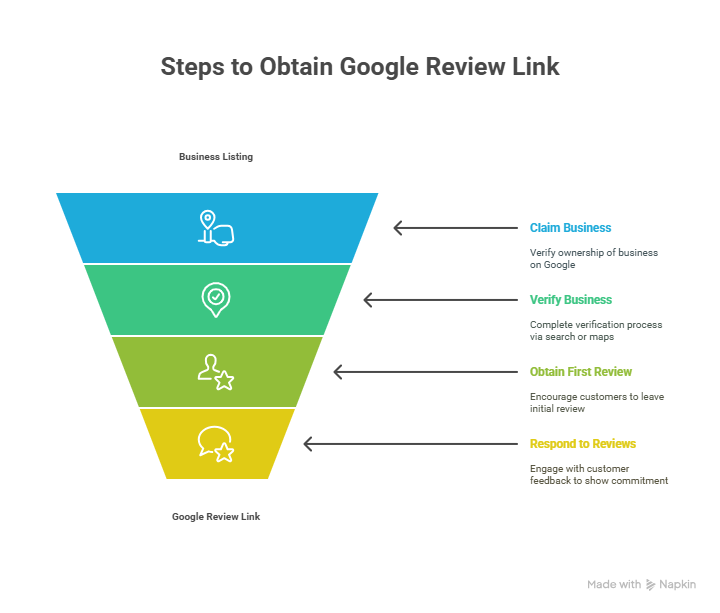
Before you can create a link for Google reviews, you need to ensure you meet the following guidelines:
- Claim and Verify Your Business on Google
Claim and verify your business page on Google Business. To do this, you need to create a Google Business Profile listing where you can manage your brand information along with the products and services.
The first process to verify your business is via Google search. Search your business on the Google search bar and select the “Own this business?” button. Follow the instructions that come upon the screen to complete the process.
Another option is via Google Maps. Simply open Google Maps, find your business address on maps, and right-click on the map’s location. Select the “Add your business” button and follow the on-screen directions to complete the process.
- Have At Least One Google Review
To get your review link, having at least one review on your Business Profile page is necessary. You can do so by reaching out to your existing customers and asking them to leave free Google reviews. You can also ask for reviews via email, offer incentives for leaving a review, or publish call-to-action (CTA) buttons on your website and social media to encourage reviews.
- Respond to Reviews
Write back to your customers appreciating their feedback and show your commitment to improvement. Respond to negative reviews by showing empathy along with relevant solutions and thank customers for their positive feedback.
By completing these requirements, you can get a direct link for your customers to leave reviews.
How to Generate Google Review Link?
There are different ways which you can use to create a review link. Let’s check all the methods with a simple step-by-step process.
- Get Google Reviews from the Search Results Page
One of the most simple steps is to generate a link from your Google location. Make sure you are signed in with your Google Business Profile before you follow the below steps:
Step 1: Search your business name on Google.
Step 2: Scroll down to see different options from your Google Business Profile. Click on the “Ask for reviews” box.
Step 3: You will see a popup with the generated link review. Copy the link to share with your customers. When clicking this link, it will redirect your customers directly to the Google review form.
- Get the Google Reviews Link from Google My Business Account
Step 1: Go to your Google Business Profile account. Sign in with your account or create a new one if you don’t have an account.
Step 2: On the homepage of your account, scroll to the Get more reviews box.
Step 3: Hit on the “Share Review form” and copy the link that comes up in the popup.
You can share this link with your customers who will then be redirected to your location on the Google Maps app. Here, a popup will appear where customers can write Google reviews.
- Use Place ID as a Google Reviews Generator
An easy way to get your Google review link is through Google PlaceID. It is a simple review link generator that points you to your Google Maps location ID:
Step 1: Open the Place ID Finder in Google Maps for developers.
Step 2: Search your business by name and location and select your business name in the search bar.
Step 3: Copy the Place ID in the popup maps window generator. Note that Place ID generates a mixed selection of letters and numbers in your link.
Step 4: Use this link “https://search.google.com/local/writereview?placeid=” and add your Place ID after the end of the given URL to create your complete Google reviews link.
- Google Maps
You can also create your direct Google review link to your company’s Google Reviews Page by using Google Maps:
Step 1: Authorize your Google Business Account and open the Google Maps app via the desktop or app button.
Step 2: Search your business on Google Maps by name and location address.
Step 3: Navigate to your business’s information card on the left-hand side of the screen and find the “Share” button.
Step 4: Copy link that pops up after you click on the Share button. You can now share the Google page review link by choosing Facebook, Twitter, or Gmail icons.
How to Share Google Review Link?
Increase the visibility of your company online by learning how to share it and convenience your customers to write reviews. Here are some of the effective methods on how you can get the desired results:
- Social Media Platforms
Social media is considered one of the best sources to share your business’s review link. Curate engaging posts and stories and add a CTA button that would take the customers to the review form. You can also add video clips or your review link URL in your bio asking for clients to leave honest feedback.
Email is an effective way to share your Google review link with a large number of audiences. You can send out a mass email with a request to leave customer feedback. You can direct the link to your business page or make it more short and precise by using a generator.
Create a post-purchase email campaign for your customers who purchase from your store. You can include incentives to motivate customers to write reviews. Another way to get more reviews is by creating a signature with a CTA button and including it at the end of all your emails.
- SMS
Text messages are a great way to advertise your review page. Keep the message short and to the point so that users are motivated to leave their reviews.
- Website
You can add Google Review widgets to your website to increase the chances of getting more reviews. By embedding a widget in your website, you are increasing accessibility, resulting in customers clicking the link and submitting their reviews.
You can choose a variety of different widget templates with different buttons, styles, features, and many more. Choose the one that is easy to understand and would suit your website. For instance, you can choose a Google review image widget to make the widget more visible to users.
You can place the widget at the bottom of your website as customers can easily find it when they scroll down. You can also leave it as a floating button or have a separate webpage dedicated to customers writing reviews.
Conclusion
Thus, you can easily follow the steps on how to create Google review links for your business. With this link, you are eliminating the six steps customers had to go through to leave you a review. Choose the method that you feel is easier and ensure more feedback from your customers.

