

Keywords are one of the most integral factors that enhance your content and help it rank higher in search engines. Every time you create a new blog or update your existing content, you start by choosing the right organic keywords. So, let’s find out how you can discover new keywords in a website to improve your search engine optimization (SEO) strategy.
What is a Site Search for Keywords?
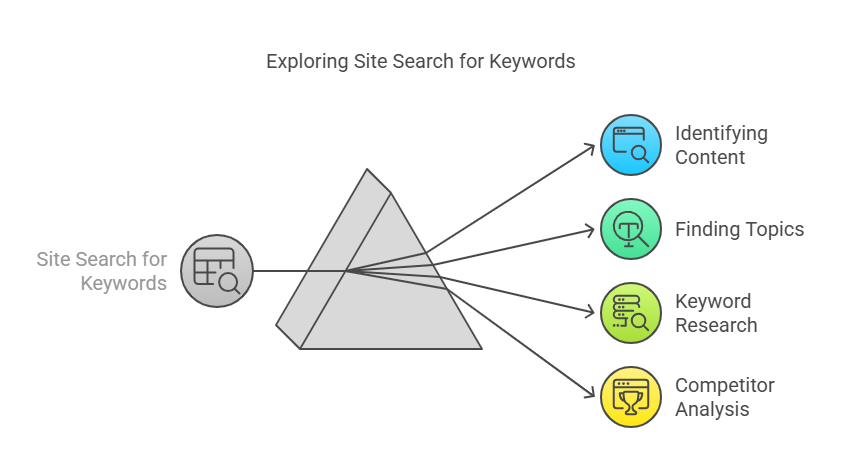
A site search or website search is an approach to identify specific content or topics on a website. This process is a part of the keyword research process and helps in finding relevant keywords used by your competitors.
Why Search Keywords on Websites?
Finding keywords on other websites or web pages can help in developing a well-defined search engine optimization strategy for your website. It can aid you in finding top keywords that are organic along with the following:
- Satisfaction Search Intent: Search intent is a crucial ranking factor for your web page. It directly impacts your web page performance in search engine results. Therefore, finding the right keywords for your website can help align your content with user intent.
- Discover New Content Ideas: Searching for new keywords is essential for relevant keyword strategy. Finding keywords in a competitor’s website can help you identify relevant and new topics for your site. It can also help you understand how they are creating content and the areas where you can improve.
- Identify Backlinks Opportunities: Search for relevant websites to develop or elevate your backlink strategy which can improve your search rank.
- Cover Topical Depth: Google depends on identifying semantically related keywords within your webpage to establish context and relevance to a subject. Incorporating natural keywords already used by your competitors in search engine results pages (SERPs) can assist in improving your blog posts by addressing the subject matter and avoiding unnecessary fluff.
- Bridge Keyword Gaps: Keyword research helps you minimize the keyword gap and include keywords that your competitors rank for in your content. This can help you take a part of your competitor’s traffic.
- Rank Higher: Monitor the performance of your web pages and see which pages are ranking for certain keywords. Incorporate an improved SEO keyword strategy to increase your search rankings and traffic. [](/blog/learn-everything-about-http-status-codes-and-their-importance)
6 Effective Ways to Search Websites for Keywords
There are a variety of ways in which you can search for keywords. Here are some of the most easy and effective methods that can aid in finding the relevant keywords:
- Make use of Ctrl + F
The simplest way to find keywords by searching websites is by using the Ctrl+F or ⌘ Command+F on a Mac. It’s a useful method that helps you locate a specific keyword or keyword phrase in a webpage along with the number of times it is used.
Simply visit the web page, and press the mentioned keys from your keyboard. This pops up a search bar where you can enter the word you are searching for. The keyword or phrase will appear in a highlighted format and you can either click the arrow button on the pop-up bar or click enter to check where the keywords are used in the overall content. This method works best when you are looking for a specific keyword or phrase on a single web page.
- Use Keyword Tools
Leverage keyword tools to find useful keywords for your website. Keyword research tools aid you with keyword ideas based on the seed keywords or topics you enter. Along with relevant suggestions for your keywords, these tools also provide you with different metrics like the search volume and the keyword difficulty.
Google’s Keyword Planner is one of the most effective keyword suggestion tools where you can find thousands of new keywords based on specific locations and dates. The process of using this tool is very simple. Enter your seed keyword or phrase for suggestions and click on enter. You can also choose a specific location in this step. Once you click enter, you’ll get related keywords with the average monthly search volume, competitor levels, as well as average bid values for PPC campaigns.
Answer The Public is another tool that provides you with a list of keywords along with questions and phrases that are relevant to your audience. You can use this tool to understand what your potential customers are searching for in Google. Therefore, these tools can help you find the best keywords to elevate your content strategy.
- Run a Web Page Audit
An effective way to generate a keyword list is by auditing the page’s content. You can choose different free or paid tools to audit a web page and find organic keywords for your website. This approach helps you identify keywords your competitors are using and how they are ranking for them.
An effective tool you can use to fast-track this process is by using NextGrowth Labs’ Free Bulk Keyword Rank Checker. In this tool, you can use seed keywords or phrases, select the language and country, and choose the website to find the ranks of certain keywords. You can narrow down your list of useful keywords by utilizing this tool.
- Use Google Search Engine Operators
To find specific keywords on an entire website, you can use the Google search operators. Type your “site:yourdomain.com” and add your search terms in Google search. Do not use any commas or signs between the operators; only put a single space before you type the keywords.
Remember to replace yourdomain.com with your target website to find the desired results. If you are looking for a keyword on a subdomain, you can narrow down your search by entering a domain like “blog.yourdoman.com” instead of the parent domain.
You can also find an exact keyword match in the URL by using the “inurl” operator” command. This command helps you find pages on your site with strong on-page optimization for topics you are looking for. This command also helps you identify competing sites that are ranking for your specific keywords.
- Utilize the Website’s Search Function
Most websites usually have their search bars which you can use to track specific content or keywords within a site. The search bar is usually present at the top-right corner of the homepage.
So, when we search using a keyword using the search bar, it provides you with the results according to the keyword or phrase you searched for. Although the quality of the search may vary and result in limited results, you can usually find content consisting of the keyword or phrase you search for.
- View Keywords in the Page Source
If you want to know how to search keywords in a web page’s source, don’t fret. The process is pretty straightforward. Check the page’s HTML source by right-clicking on the page and selecting “View Page Source.” Alternatively, you can use the Ctrl+U command from your keyword.
After the source code opens up, use the Ctrl+F command to search for specific keywords. Use the key tags such as title to check for keywords in the content’s title or use the tag meta name=”description” to identify competitive phrases. Therefore, this technique helps you find which keywords your competitors are using on specific web pages, their meta descriptions, alt text, as well as headers.
Conclusion
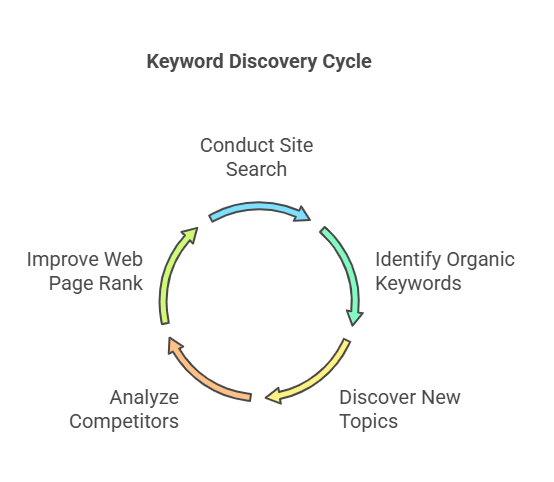
Thus, understanding how to search for keywords on websites and web pages helps in developing a solid SEO strategy. The site search technique is often neglected, however, can prove to be a goldmine of resources. You can identify organic keywords, and new topics, and also assess what your competitors are doing. Use the effective steps mentioned in this blog to seamlessly find new keywords and improve your web page rank.

