
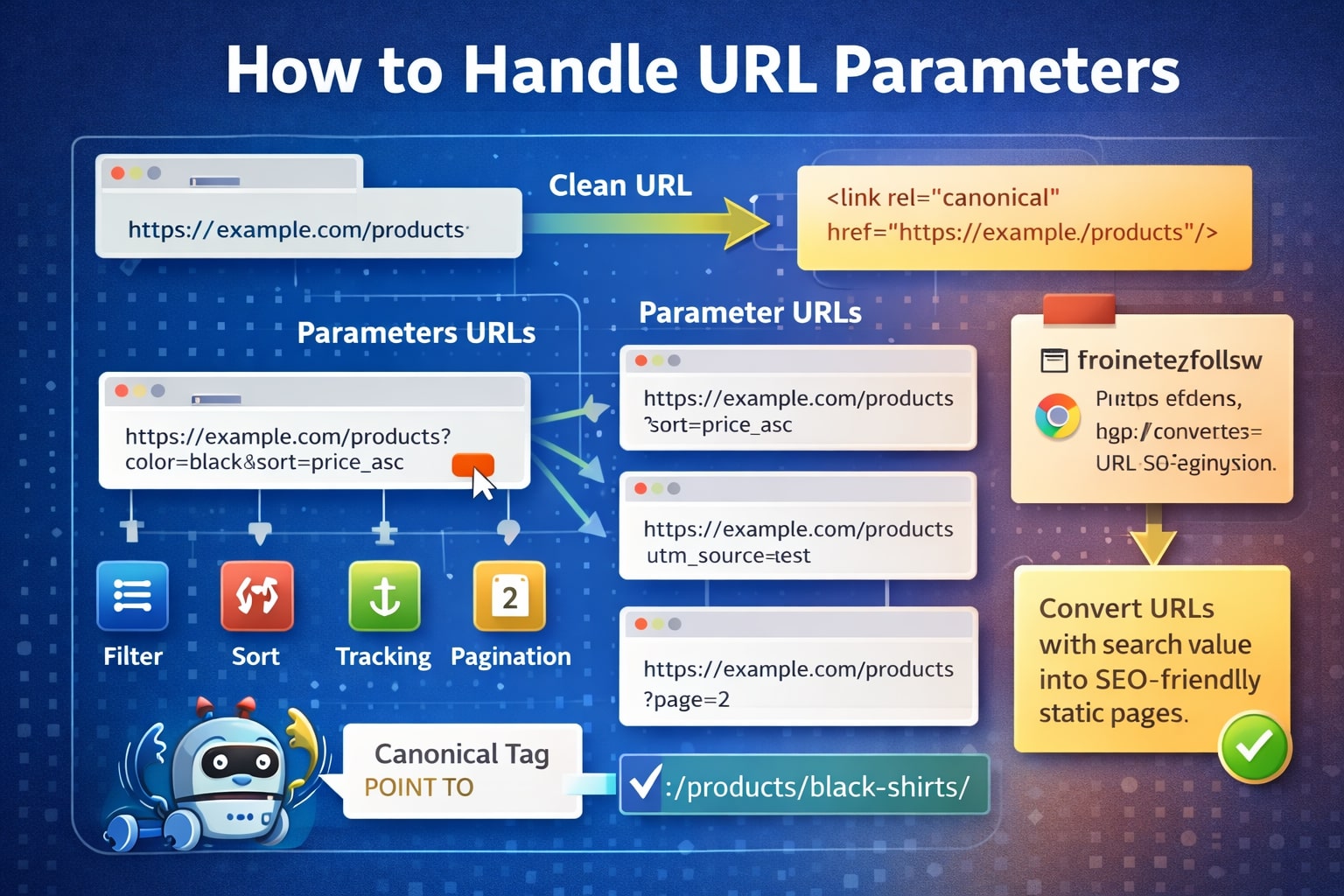
URL parameters play a critical role in SEO. Although they are invaluable assets for adept SEO professionals, they can lead to major challenges and hinder your site’s ranking along with various other problems. Let’s understand everything about URL parameters and how to manage them.
What are URL Parameters?
URL parameters or query string parameters provide additional information in a web address. They enable efficient navigation through the Internet without the need to input lengthy and intricate URLs each time you seek specific content.
For instance, suppose you wish to check the current weather in Paris. Instead of typing the entire URL, you can streamline the process by entering the city name in the browser bar. Your URL would look like this:
www.weather.com?location=Paris
The “?” symbol denotes the presence of a question mark which signals Google to search for the designated keyword, known as the “parameter.” In this instance, the parameter is “location,” representing the city name. After the “?” is a sequence of letters and numbers, denoting the “keyword? value?&…” structure. In this context, the term “keyword” signifies an attribute being queried, and “value” represents the corresponding value.
For another parameter example, let’s consider a scenario where you aim to showcase different product prices based on whether a user enters “affordable” or “luxury” in a search box. The following URL can be used for affordable pricing:
/affordable-pricing?50-500
Here, the numeric range from 50-500 signifies the affordable pricing bracket.
For luxury items, you can set the pricing above $500, within the range of $500 to $1000. The complete URL would look like:
/luxury-pricing?500-1000
While real URLs may be more intricate, these examples illustrate the concept, showcasing how URLs could appear within the specified parameters and ranges.
How Do URL Parameters Work?
The parts of a URL are made of key-value pairs, where the key tells you what data is being passed and the value is the data you are passing, such as identified. They look like “?key=value” but may be separated by ampersands (&) like “?key=value&key2=value2” if there is more than one pair.
Now, parameters can be either active or passive. Let’s look at some examples:
- Active Parameters
Active parameters modify the content of a webpage.
Filtering: This narrows down content, showing specific information that a user is interested in.
Example: Faceted navigation in e-commerce- ?category=captops
Sorting: This rearranges content based on specific criteria like price or rating.
Example:?sort=lowest\_price
Pagination: It divides content into a series of related pages for easier navigation.
Example: ?page=3
Translation: This changes the language of the content.
Example: ?lang=fr
Search: This queries a website for information that a user is looking for. In search engines like Google, the key “q” is commonly utilized for queries, and the value encompasses details about the user’s search.
Example: ?q=cats+and+dogs
- Passive Parameters
Passive parameters do not alter the content but are typically used for tracking purposes.
Affiliate IDs: These pass as an identifier to track the source of sales and signups.
Example: ?id=partmerA
Advertising Tags: These track the sources of advertising campaigns.
Example:?utm\_source=newsletter
Session IDs: These identify a particular user, although it’s not common on modern websites to use session ID for tracking.
Example: ?sessionid=12345
Video Timestamps: These jump to a designated timestamp in a video.
Example: ?t=135
What SEO Issues Occur with URL Parameters?
URL parameters can lead to several issues in SEO, especially when multiple parameters are used. Here are some of the problems that you may encounter:
- Creation of Duplicate Content
URL parameters often create duplicate content, where each parameter-based URL is a new page. While this may not lead to exclusion from search results, it can result in keyword cannibalization, an occurrence where multiple pages on a website compete for the same target keyword. This potentially confuses search engines and leads to a decrease in overall search visibility. Therefore, it can diminish Google’s perception of your site quality.
- Waste Crawl Budget
Redundant parameter pages consume crawl budgets, reducing the ability to index relevant SEO pages and increasing the server load. Google emphasizes the issues with overlay complex URL uses and their impact on crawling efficiency.
- Split Page Ranking Signals
Multiple permutations of the same page content with different parameters can dilate the ranking signals. Confused crawlers may struggle to determine which version to index for a search query.
- Reduces URL Clickable
Unsightly and hard-to-read parameter URLs are less likely to be clicked and can directly impact page performance. Poor URL readability affects click-through rates, influencing rankings and diminishing brand engagement.
Evaluate the Scope of Your Parameter Issue
It is critical to be aware of every parameter that is employed on your website. However, likely, your developers don’t maintain an updated list. To identify and comprehend these parameters, along with their impact on search engine crawling and user value, follow these steps:
- Utilize a Crawler: Use tools like Screaming Frog to search for “?” in the URL.
- Check Google Search Console URL Parameters Tool: Google automatically adds discovered query strings.
- Examine Log Files: Assess if Googlebot is crawling URLs with parameters.
- Conduct Searches Using “site:inurl: advanced operators”: Understand how Google is indexing identified parameters by using a site:example.com inurl:key combination query.
- Examine Google Analytics All Pages Report: Look for “?” to observe how users interact with each of the identified parameters. Ensure that query parameters in URL are not excluded in the view setting.
Based on this information, you can make informed decisions on how to effectively manage each parameter on your website.
How to Fix URL Parameters?
You can implement several measures to reduce the issues caused by URL parameters:
- Limit Parameter-Based URLs
Conduct a review of parameter generation to reduce the number of URLs, minimizing negative SEO impact. Address these four common issues:
- Eliminate Unnecessary Parameters: Request a list of all website parameters and functions from your developer. Identify and remove the parameters with obsolete or non-essential functions, such as redundant session IDs or rarely used filters in faceted navigation.
- Prevent Empty Values: Only add URL parameters with a purpose and avoid blank values. Make sure to eliminate keys with no meaningful value.
- UseKeys Only Once: Avoid using the same parameter name with different values. For multi-select options, combine values under a single key.
- Order URL Parameters: Maintain a consistent parameter order by creating a script to arrange them consistently. Prioritize translating, identifying, paginating, filtering, reordering or search parameters, and finally tracking. [](/blog/best-tips-and-techniques-to-boost-your-seo-ranking)
By implementing these approaches, you can allow efficient use of the crawl budget, reduce duplicate content, as well as consolidate ranking signals to fewer pages. Although this approach requires moderate technical implementation time, you can apply it to all types of parameters.
- Canonical Tags
The use of the rel=”canonical” link attribute is employed for parameter handling. This attribute signals to search engines that a page shares identical or similar content with another, prompting the consolidation of rankings signals to the specified canonical URL.
Implementing rel=canonical for parameter-based URLs, especially for tracking, identifying, or reordering parameters, is relatively straightforward. It serves as an effective measure to prevent duplicate content issues and centralized ranking signals to the canonical URLs.
However, its effectiveness varies for certain parameter types like pagination, searching, translating, or specific filtering parameters, and it may consume crawl budgets on parameter pages. Despite being a strong hint, its impact is not universally applicable.
- Noindex Meta Robots Tag
Utilize the meta robots noindex tag for effective parameter handling by applying a noindex directive to pages that lack SEO value. This prevents search engines from indexing the page, reducing crawl frequency, and potentially leading to a nofollow on the page’s link over time.
Implementing the meta robots noindex tag offers a straightforward technical setup, effectively preventing duplicate content issues across all parameter types excluded from the index. This approach efficiently removes parameter-based URLs from the search index. However, it doesn’t completely halt crawling, only reduces its frequency. Additionally, it cannot consolidate ranking signals and is perceived by search engines as a strong hit rather than a directive.
- Blocking in Robots.txt
Search engines initially consult the robots.txt file before proceeding with site crawling. If they encounter any disallowed directives, they refrain from accessing those sections. This file allows you to restrict crawler access either for all parameter-based URLs using “Disallow: /?” or selectively for specific query strings that you prefer not to be indexed.
Leveraging the robots.txt disallow directive offers a straightforward technical setup, facilitating effective use of the crawl budget. It also prevents duplicate content issues across all undesired parameter types. However, it falls short of consolidating ranking signals and does not remove existing URLs from the search index.
- Perform Site Audit[](/blog/learn-everything-about-http-status-codes-and-their-importance)
By performing site audits, you can check what parameters are used on your website. Search for URLs that contain a question mark (?) or you can even use the advanced filters to find pages with multiple parameters to identify the different parameters used on your website.
Understand the purpose of each parameter by checking a few pages and exploring the duplicates report for exact or near-duplicates, visually inspecting clusters to spot variations, and checking canonical tags.
- Move from Dynamic to Static URLs
Switching from dynamic to static URLs is an SEO strategy that you can achieve through server-side rewrites. It improves site structure and adds keyword relevance. However, challenges arise for non-keyword parameters in faceted navigation or searching.
While some suggest using POST requests to maintain user experience, avoiding parameters entirely is not always feasible. The solution here is to use query strings for parameters to avoid indexing (for example: pagination) and employ static URL paths for those meant to be indexed.
Moving from dynamic to static URLs offers advantages by directing crawler focus to URLs with a higher ranking potential. However, it comes with disadvantages like substantial development time investment for URL rewrites and redirects, inability to prevent duplicate content, or consolidation of ranking signals. Additionally, it is unsuitable for all parameter types and has limitations in providing linkable or bookmarkable URLs.
- Use Google’s Search Console URL Parameter Tool
Use this parameter tool to guide crawlers on handling parameters based on their impact. Despite a warning about potential search result reduction, proactively configure parameters, categorizing them for better control. This prevents duplicate pages from impacting your website’s ranking.
Note that parameters added by Google can’t be removed, even if it’s obsolete. Consider adding parameters configured as “No URL” in Google Search Console to Bing’s ignore URL parameters tool.
This tool offers a convenient solution without requiring developer time. It enables efficient crawl budget utilization and is likely to prevent duplicate content issues across various parameter types. However, it lacks the ability to consolidate ranking signals and is seen by Google as a helpful hint, not a directive. Additionally, it primarily works for Google, offering lesser control for Bing.
Conclusion
Thus, URL parameters make things easier when it comes to changing or tracking content. However, it also brings a variety of problems due to which having a proper indexing strategy is a must. For effective SEO-friendly parameter handling, conduct keyword research to identify parameters suited for search engine-friendly, static URLs.
Implement proper pagination handling and consistent ordering rules for remaining parameter-based URLs. Utilize rel=canonical for ranking and consolidation and configure URL parameter handling in Google and Bing. Ensure exclusion for parameter-based URLs from the XML sitemap and document the impact of KPIs, regardless of the chosen strategy.

