
What is SDK?
SDK in full form is “Software Development Kit”. It is a set of software tools and libraries that developers use to create applications for specific platforms, frameworks, or operating systems.
SDKs provide pre-built functions and resources that streamline the development process and allow developers to interact with the platform or system effectively. These tools also enable app developers to create applications that can seamlessly combine with another software program.
They facilitate the efficient creation of new tools by developers and simplify the process by providing pre-built components. Integrating new features becomes a matter of ensuring compatibility with the existing system.
Two categories of mobile SDK apps exist –
- Open-source SDK: This comprises code available to the public.
- Closed-source SDK: This consists of code that is rigorously protected and not readily accessible.
Tools and components often found in Software Development Kits (SDKs)
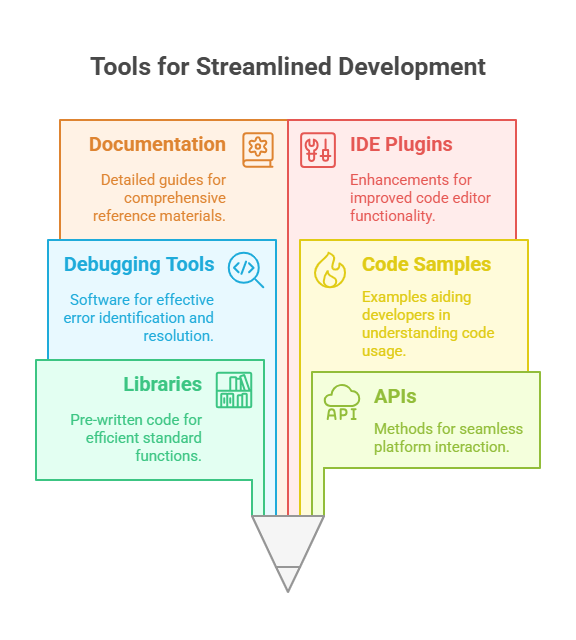
- Libraries: Pre-written code for standard functions.
- APIs (Application Programming Interfaces): Methods for interacting with the platform.
- Debugging Tools: Software for identifying and fixing coding errors.
- Code Samples: Examples of code to help developers understand usage.
- Documentation: Detailed guides and reference materials.
- Integrated Development Environment (IDE) plugins: Enhancements for code editors.
- Emulators and Simulators: Tools for testing on different devices.
- GUI (Graphical User Interface) Components: Resources for creating user interfaces.
- Build and Compilation Tools: Tools for assembling and compiling code.
- Testing and Profiling Tools: Utilities for quality assurance and performance analysis.
- Plugins: These are integrations that seamlessly connect with well-known development environments such as Eclipse, Visual Studio, or Xcode. [](/blog/what-is-an-offerwall)
These are merely a handful of instances of the tools that could be part of an SDK. The exact tools and assets contained in a mobile SDK will vary according to the specific platform or programming language for which it has been created.
Comparison of SDKs and APIs
SDKs
- A comprehensive package containing tools, libraries, documentation, and sometimes an API.
- Offers a complete development environment for a specific platform or framework.
- Provides pre-built components and functionalities to streamline application development.
- Enables developers to build applications more efficiently.
- It often includes additional resources, such as sample code and debugging tools.
- Requires installation and configuration for use.
APIs
- Defines the rules and protocols for interaction between different software applications.
- Focuses on specifying methods, data formats, and endpoints for communication.
- Allows applications to request and exchange data or services.
- Simplifies integration between applications, services, or systems.
- Typically used to extend the functionality of existing software.
- Requires developers to write custom code to interact with the API.
Using mobile app SDKs
To leverage a mobile app SDK, start by incorporating it into your mobile app development project. The SDK contains essential tools, libraries, and documentation tailored for mobile platforms like iOS or Android.
Follow the SDK’s integration instructions, which often involve adding code snippets or configurations to your project. Access the SDK’s features and functionalities to enhance your app, such as integrating ad networks or analytics.
Testing is crucial to ensure proper integration. Once satisfied, deploy your mobile app to app stores or distribute it as needed, taking advantage of the SDKs’ usage and capabilities for improved functionality and user experience. [](/blog/what-is-a-dashboard-benefits-uses-and-types)
SDKs and NextGrowthLabs (NGL)
NextGrowthLabs’ SDK in app offers a range of benefits for developers and businesses. It provides powerful marketing and app optimization tools, enhancing user experiences and driving app growth.
By integrating NGL’s SDK app, developers can access advanced features for app store optimization, precise audience targeting, and automated marketing campaigns. This results in improved visibility, increased user engagement, and higher conversion rates.
Additionally, the SDK use allows for real-time monitoring and data-oriented decision-making, empowering businesses to refine their strategies. NGL’s SDK integration streamlines app marketing and optimization, ultimately leading to higher app revenue, increased user satisfaction, and a competitive edge in the digital marketplace.

